Main interface elements
1. Collaborative editing
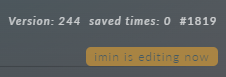
In any module, if another administrator changes a document you are editing, an icon with that administrator's name appears. Important: while this happens, all fields in the document are locked until the save completes.
2. System notifications
There are three types of system notifications:
Successful notifications appear when changes are saved, for example when you add a new attribute set, rename a form, or change an item's position in a menu.

Warning notifications tell you that you lack the required permissions, that uploaded files exceed the allowed size, that the disk limit has been exceeded, and so on. The notification text always tells you why you received it.

Danger notifications tell you when an operation you started has failed, such as data indexing, attribute set processing, or file upload.

3. Top information panel
The top information panel shows indexing in progress and any errors that have occurred.
A clock icon with a numeric progress counter means data indexing is running. Click the cross button on the right to cancel indexing.

A green diamond with a checkmark means indexing has completed successfully.

A blue cloud icon means a file is being uploaded.

A red diamond with an exclamation mark can indicate one of several problems.
- Files cannot be uploaded: the disk limit has been exceeded
- You have exceeded the allowed number of records in the database. Adding records will be disabled
- You have exceeded the allowed number of admin accounts in the database. Adding admins will be disabled
- Data indexing error
- The data index does not contain all the data To see which error you have, hover over the icon.

4. Document status panel
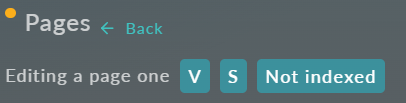
The document status panel shows the state of the open document.
A clock icon with a numeric progress counter means data indexing is running. Click the cross button on the right to cancel indexing.
Saved means the document you are editing was saved successfully.


Valid means every field in the document meets the conditions set for it and the document is ready to be saved.


Validating: the document is currently being validated.

Invalid: the document contains incorrect data and cannot be saved.

Not indexed: the document has not been indexed.

Not saved: an error occurred while saving the document.

Editing is disabled - updating data: you cannot edit the document while another user is working with it.
