The http request node
The http request node sends HTTP requests to external web services or APIs. It supports several HTTP methods, ways of passing data, and authentication, and gives you flexible control over requests and responses.
http request node settings
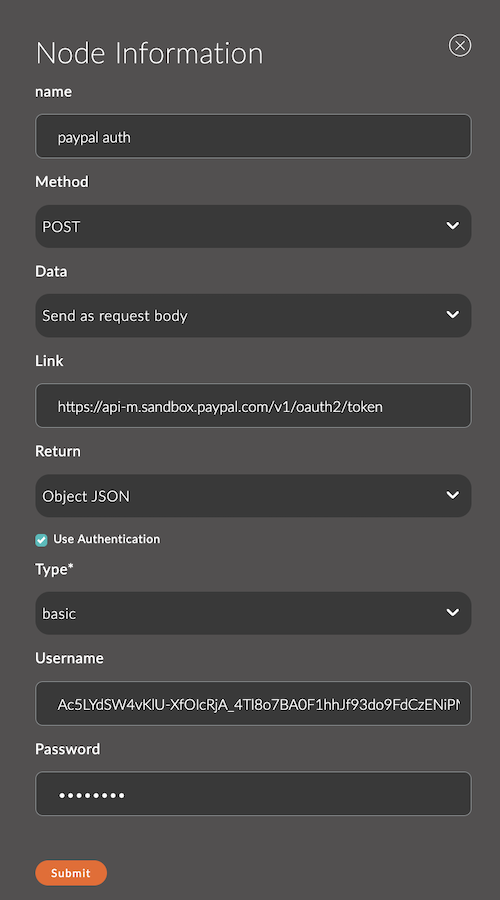
1. Name
The node name.
It appears in the workspace and helps you identify the node.
If you leave it empty, the node is named http request.
Example:
- Node name:
Get Weather Data
2. Method
The HTTP method used for the request. Choose it based on the operation you need to perform.
Available methods:
GET: Retrieve data.POST: Send data.PUT: Update data.DELETE: Delete data.HEAD: Retrieve response headers.
Example:
- Method:
POST
3. Link
A static URL that the request is sent to.
To set the address dynamically, pass it in msg.url.
Example:
- Link:
https://api.example.com/data
4. Data
Defines how input data is added to the HTTP request. The options are:
-
Ignore (default):
Input data isn't used in the request. Ifmsg.payloadexists, it's ignored.Example:
Ifmsg.payloadcontains a JSON object, it isn't included in the request.
-
Add to query parameters:
Data frommsg.payloadis converted to query parameters and appended to the URL.Example:
Ifmsg.payloadcontains:{"key1": "value1","key2": "value2"}and Link is
http://example.com/api, the resulting request is:
GET http://example.com/api?key1=value1&key2=value2.
-
Send as request body:
Data frommsg.payloadis sent in the request body. This option suits thePOSTandPUTmethods, which often carry data in the body.Example:
Ifmsg.payloadcontains:{"name": "John Doe","email": "john.doe@example.com"}and the request method is
POST, this data is sent in the request body.
5. Return
Defines the format in which the node processes the server response.
Options:
- String: The response is converted to a string (default).
- Object JSON: If the server responds with JSON, it's automatically converted to a JavaScript object.
- Binary Buffer: The response is returned as a binary buffer (useful for binary data such as images or files).
Example:
- If you select
Object JSON, the responseis converted to:{"status": "ok", "value": 42}msg.payload = { status: "ok", value: 42 };
6. Use Authentication
This checkbox enables built-in authentication (off by default). When you select it, the form shows a Type field for the authentication method (basic by default):
basic
- Username: The username.
- Password: The password.
bearer
- Password: The access token.
digest
- Username: The username.
- Password: The password.
Input
The http request node accepts a msg message object with these properties:
- msg.url: The request URL (if it isn't set in the node settings).
- msg.method: The HTTP method (if it isn't set in the node settings).
- msg.payload: The request body (used with
POSTandPUT). - msg.headers: HTTP request headers (an object).
Output
The node returns a msg object with information about the request:
- msg.payload: The server response data.
- msg.statusCode: The HTTP status code of the response (for example,
200or404). - msg.headers: The response headers.
- msg.responseUrl: The URL the request was sent to.
- msg.error: An error description (if the request failed).
Examples
Example 1: Sending a GET request
Node settings:
- Method:
GET - Link:
https://api.weatherapi.com/v1/current.json?key=API_KEY&q=London
Flow:
[inject] ---> [http request] ---> [debug]
Result: The node returns JSON with the current weather.
Example 2: Sending data with POST
Node settings:
- Method:
POST - Link:
https://api.example.com/devices - Data:
Send as request body
Flow:
[function] ---> [http request] ---> [debug]
Code in the function node:
msg.payload = {
    deviceId: "sensor123",
    status: "active"
};
msg.headers = { "Content-Type": "application/json" };
return msg;
Result: The data is sent, and the node returns the server response.
Example 3: Dynamic URL and authentication
Node settings:
- Link: (leave empty)
Flow:
[function] ---> [http request] ---> [debug]
Code in the function node:
msg.url = "https://api.example.com/user/123";
msg.headers = { Authorization: "Bearer YOUR_TOKEN" };
return msg;
Result: The node sends a request to the specified URL with the authentication token.