Node template
The template node is used to generate data based on a specified template. It allows for the creation of strings, HTML, JSON, and other formats by applying dynamic substitution of values from the msg message or other sources.
Settings of the template node
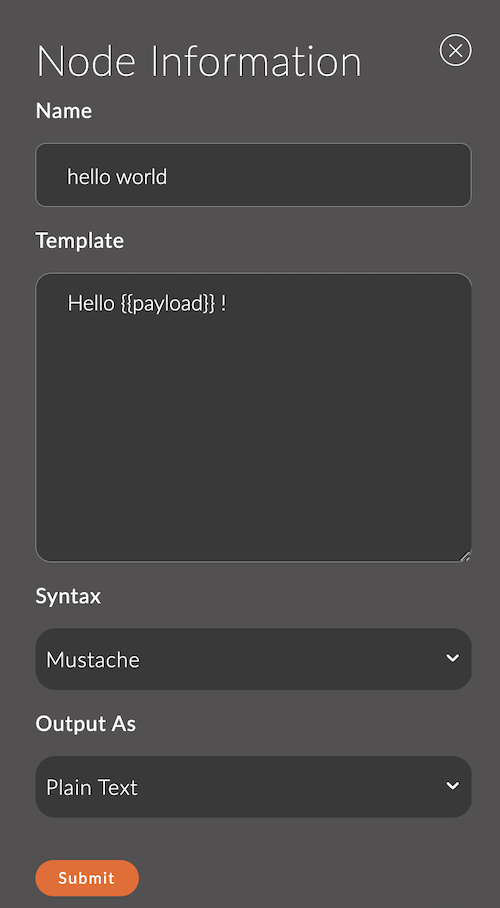
1. Name
A field for specifying the name of the node.
The name is displayed in the workspace and helps to easily identify the node.
If left empty, the node will be called template.
Example:
- Node name:
hello world
2. Template
The main field where the template text is specified.
It supports data substitution through curly braces ({{...}}) and the templating capabilities of Mustache.
Example template:
Hello {{payload}} !
3. Syntax
Defines the syntax of the template:
- Mustache: Mustache template.
- Plain Text: Plain text string.
4. Output As
Defines the format of the node's output data:
- Plain Text: Creates a text string.
- JSON: Creates JSON.
- YAML: Creates YAML.
Features of Mustache Syntax
-
Value Substitution:
Uses{{property}}, wherepropertyis a property of themsgobject.Example:
- Template:
Hello, {{name}}! - Message:
{ "name": "Alice" } - Result:
Hello, Alice!
- Template:
-
Conditional Rendering:
Conditional logic is supported through the existence or absence of a value.Example:
{{#isOnline}}<p>Status: Online</p>{{/isOnline}}{{^isOnline}}<p>Status: Offline</p>{{/isOnline}} -
Loops:
You can iterate over arrays.Example:
<ul>{{#items}}<li>{{.}}</li>{{/items}}</ul>Message:
{ "items": ["Item 1", "Item 2", "Item 3"] }Result:
<ul><li>Item 1</li><li>Item 2</li><li>Item 3</li></ul> -
HTML Escaping:
Mustache escapes special HTML characters by default.
To avoid escaping, use{{{...}}}.Example:
{{{htmlContent}}}
Input Data
The node accepts a msg object. Data from the message is used in the template for value substitution.
Example message:
{
  "payload": {
    "temperature": 22.5
  },
  "name": "Alice"
}
Output Data
The node sends a msg object, augmented with the processed template. The result is written to msg.payload.
Usage Examples
Example 1: Creating an HTML Page
Template:
<!DOCTYPE html>
<html>
<head>
  <title>Temperature Report</title>
</head>
<body>
  <h1>Temperature Report for {{name}}</h1>
  <p>Current temperature: {{payload.temperature}}°C</p>
</body>
</html>
Message:
{
  "payload": {
    "temperature": 22.5
  },
  "name": "Alice"
}
Result:
An HTML page with dynamic data.
Example 2: Generating a JSON Response
Template:
{
  "status": "{{status}}",
  "data": {
    "temperature": {{payload.temperature}},
    "humidity": {{payload.humidity}}
  }
}
Message:
{
  "status": "ok",
  "payload": {
    "temperature": 22.5,
    "humidity": 60
  }
}
Result:
{
  "status": "ok",
  "data": {
    "temperature": 22.5,
    "humidity": 60
  }
}