Node function
The function node is used to write custom JavaScript code, allowing for complex calculations, data transformations, and message processing logic. It provides the flexibility to implement logic that is not supported by standard nodes.
Settings for the function node
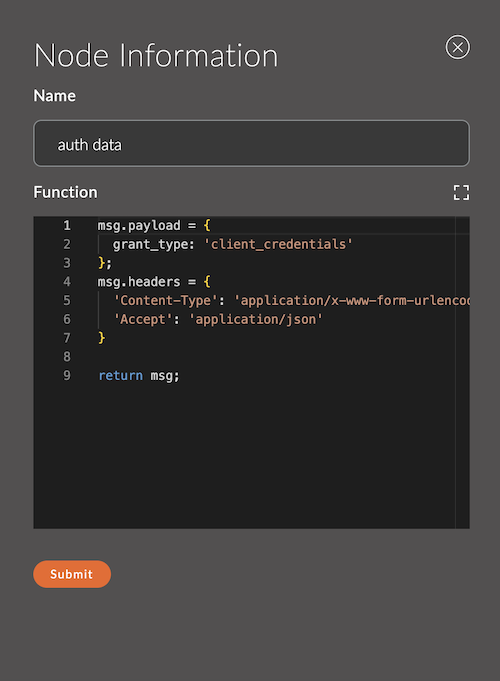
1. Name
A field for specifying the name of the node.
The name is displayed in the workspace and helps easily identify the node.
If left empty, the node will be called function.
Example:
- Node name:
auth data
2. Function
This field is where the JavaScript code is entered, which will be executed for each message passing through the node.
Input Data Format:
The code receives an object msg, representing the current message.
Output Data Format:
- The node must return a message object (or an array of objects) to pass data further down the stream.
- If
nullis returned, the message will not be sent further.
Example:
// Increment the value of msg.payload by 1
msg.payload = msg.payload + 1;
return msg;
3. Output Example (JSON)
An example of the data returned by the function, in JSON format.
This example is used to build the data schema for the next node — its fields appear in the Input Schema block of the next node. The editor checks the example against the function code.
The fields of the example describe the root of the msg object, not msg.payload: the function returns the entire message.
The example also serves as test data: if the function does not pass data further when the Execute button is pressed in one of the following nodes (admin-api, http request), the value of this field is used.
Example:
{
  "payload": {
    "orderId": 123,
    "status": "paid"
  }
}
Usage Examples
Example 1: Multiplying the value in msg.payload
msg.payload = msg.payload * 2;
return msg;
Description:
- Takes the value of
msg.payload, multiplies it by 2, and sends the updated object.
Example 2: Adding a new property
msg.newProperty = "Hello, World!";
return msg;
Description:
- Creates a new property
newPropertyand adds it to themsgobject.
Example 3: Conditional message processing
if (msg.payload > 100) {
    msg.alert = "High value detected!";
} else {
    msg.alert = "Value is normal.";
}
return msg;
Description:
- Adds an
alertproperty with a warning message depending on the value ofmsg.payload.
Example 4: Filtering messages
if (msg.payload > 50) {
    return msg; // Pass the message further
}
return null; // Stop the message
Description:
- Passes messages only with
msg.payload > 50, while others are stopped.