The switch node
The switch node routes messages based on their content, structure, or other conditions. Use it to build conditional logic in flows.
switch node settings
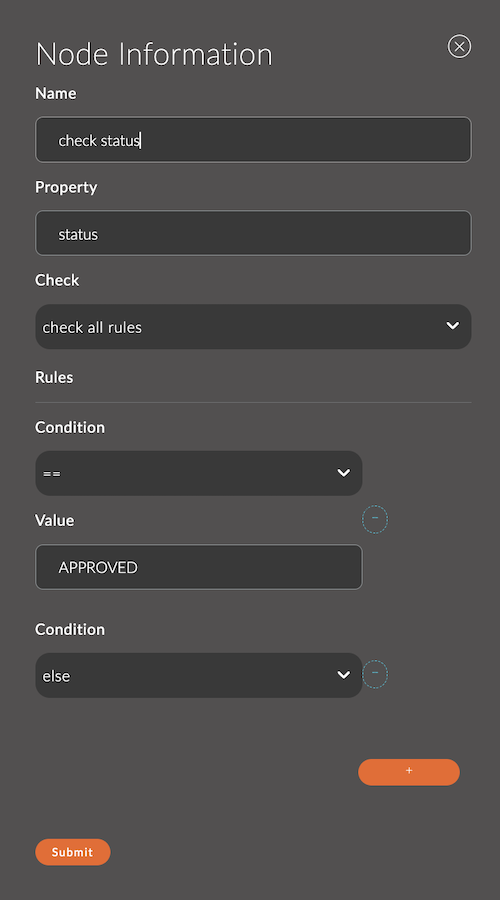
1. Name
The node name.
The name appears in the workspace and helps you identify the node.
If you leave it empty, the node is named switch.
Example:
- Node name:
check status
2. Property
The property of the msg message object that the conditions are checked against. The default is payload.
Example:
msg.payloadmsg.topicmsg.device.temperature
Context properties (flow, global) are also supported.
3. Check
- check all rules (default):
A message that matches several conditions can be sent to several outputs. - stop after first match:
The message goes only to the first output whose condition it matches.
4. Rules
Rules define the routing logic. Each rule is linked to one of the node's outputs, so the node has one output per rule. When several rules match, the Check field determines how many outputs the message goes to.
A rule has two fields: Condition, the condition type, and Value, the value to compare against. For the equals true, equals false, equals null, not equals null, empty, and not empty conditions, the Value field is hidden.
Available condition types:
==: Checks whether the value is equal.!=: Checks whether the value is not equal.<: Checks whether the value is less.<=: Checks whether the value is less than or equal.>: Checks whether the value is greater.>=: Checks whether the value is greater than or equal.has key: Checks whether the object contains the specified key.between: Checks whether the value is within the specified range (inclusive).contains: Checks whether the string or array contains the specified value.matches regex: Checks whether the string matches the regular expression.equals true: Checks whether the value istrue.equals false: Checks whether the value isfalse.equals null: Checks whether the value isnull.not equals null: Checks whether the value is notnull.is of type: Checks whether the value is of the specified type (for example,string,number,boolean).empty: Checks whether the string, array, or object is empty.not empty: Checks whether the string, array, or object is not empty.else: Applies if none of the other conditions are met.
Example:
- Condition:
>, Value:50
Input
The node accepts a msg object.
The Property field sets which properties are checked.
Output
The node sends msg to the output whose condition it matches.
If the message matches no condition, it isn't sent to any output.
Usage examples
Example 1: Filtering temperature data
Task:
Split the data into three categories: low, normal, and high temperature.
Flow:
[inject] ---> [function] ---> [switch] ---> [debug (low temp)]
                                  |             [debug (normal temp)]
                                  |             [debug (high temp)]
switch node settings:
- Property:
msg.payload - Conditions:
is less than 10→ Output 1is between 10 and 30→ Output 2is greater than 30→ Output 3
Result:
Temperatures are routed according to their value.