The http response node
The http response node sends HTTP responses to requests handled by the http in node. It completes the request processing cycle and returns data to the client.
http response node settings
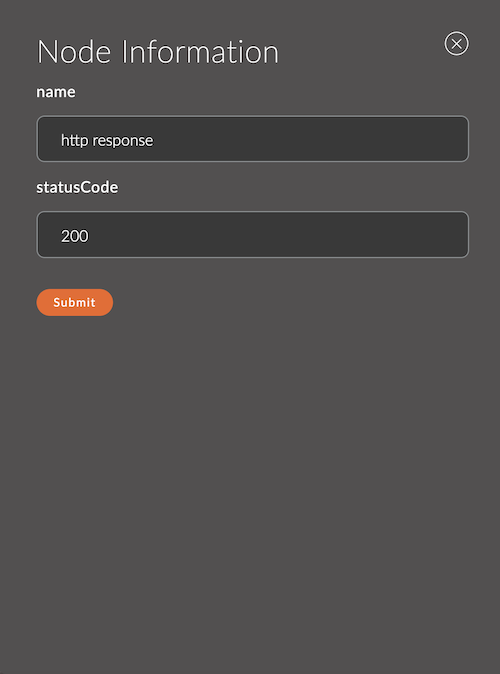
1. Name
The node name.
The name appears in the workspace and helps you identify the node.
If you leave it empty, the node is named http response.
Example:
- Node name:
Send JSON Response
2. Status Code
The HTTP status code of the response, set in the node form. The default is 200.
Example:
- Status Code:
201
Fields set by the input message (msg)
The http response node builds the HTTP response from the msg object it receives as input. The main parameters are:
-
msg.payload
The response content, sent to the client in the response body.Example:
- To send text:
msg.payload = "Hello, World!";
- For a JSON response:
msg.payload = { status: "ok", value: 42 };
- To send text:
-
msg.statusCode
The HTTP status code of the response. If this field is not set,200 OKis used by default.Example status codes:
200: success.201: resource created successfully.400: client error.404: resource not found.500: internal server error.
Example:
msg.statusCode = 404; // Resource not found
-
msg.headers
An object with the HTTP response headers. Use it to set, for example, the content type, caching, or custom headers.Example:
msg.headers = {"Content-Type": "application/json","Cache-Control": "no-cache"};
Usage examples
Example 1: Sending a successful JSON response
Flow:
[http in] ---> [function] ---> [http response]
function node code:
msg.payload = { success: true, message: "Request processed successfully" };
msg.statusCode = 200;
msg.headers = { "Content-Type": "application/json" };
return msg;
Result:
The client receives this response:
HTTP/1.1 200 OK
Content-Type: application/json

{
    "success": true,
    "message": "Request processed successfully"
}
Example 2: Handling an error
Flow:
[http in] ---> [function] ---> [http response]
function node code:
msg.payload = { error: "Invalid request parameters" };
msg.statusCode = 400;
msg.headers = { "Content-Type": "application/json" };
return msg;
Result:
The client receives this response:
HTTP/1.1 400 Bad Request
Content-Type: application/json

{
    "error": "Invalid request parameters"
}
Example 3: Empty response with a custom status
Flow:
[http in] ---> [http response]
Code in the function node before the http response node:
msg.payload = null; // Empty response body
msg.statusCode = 204; // No content
return msg;
Result:
The client receives this response:
HTTP/1.1 204 No Content