The http in node
The http in node creates HTTP endpoints that handle incoming HTTP requests (GET, POST, PUT, and others). It is the entry point for interacting with external systems over HTTP.
Important: All paths you specify automatically get the prefix /api/admin/workflows/endpoints/.
http in node settings
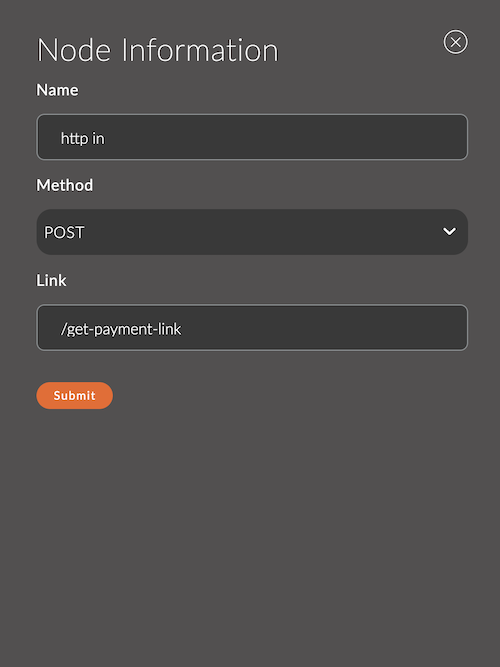
1. Name
The node name.
The name appears in the workspace and helps you identify the node.
If you leave it empty, the node is named http in.
Example:
- Node name:
get payment link
2. Method
The HTTP method the node handles. Available options:
- GET: Retrieves data.
- POST: Sends data.
- PUT: Updates data.
- DELETE: Deletes data.
- PATCH: Partially updates data.
- OPTIONS: Requests metadata about the API.
3. Link
The path (endpoint) where the node handles requests.
- The path starts with
/. - It can include route variables, for example
/data/:id.
Example:
- Link:
/get-payment-link - Link with a parameter:
/get-payment-link/:orderId
4. Protected
A checkbox that protects the endpoint. Selected by default.
5. Output Example (JSON)
An example of the data the node passes along the flow, in JSON format.
This example defines the data schema for the next node: its fields appear in the Input Schema block of that node. If the field is empty or contains invalid JSON, no schema is passed further along the flow.
Incoming message format
When a request arrives at the specified path with the selected method, the http in node creates a msg message with the following properties:
-
msg.req: The HTTP request object, including headers, parameters, body, and other data.msg.req.params: Route parameters (for example,:idin/api/data/:id).msg.req.query: GET query parameters.msg.req.body: The request body (for POST, PUT, and PATCH).
-
msg.res: An object for controlling the HTTP response. It is usually passed to thehttp responsenode, which sends the response to the client.
Usage examples
Example 1: Handling a GET request
Scenario: Return temperature data.
Node settings:
- Method:
GET - Link:
/temperature
Flow:
[http in] ---> [function] ---> [http response]
function node code:
msg.payload = { temperature: 22.5, unit: "Celsius" };
return msg;
Result: A client that sends a GET request to /api/admin/workflows/endpoints/temperature receives this JSON response:
{
  "temperature": 22.5,
  "unit": "Celsius"
}
Example 2: Handling a POST request
Scenario: Receive and save data from a device.
Node settings:
- Method:
POST - Link:
/data
Flow:
[http in] ---> [function] ---> [http response]
function node code:
// Read data from the request body
const data = msg.req.body;
msg.payload = { status: "success", receivedData: data };
return msg;
Result: The node accepts data from the POST request body and returns a confirmation response.
Example 3: Using route parameters
Scenario: Get data by device ID.
Node settings:
- Method:
GET - Link:
/device/:id
Flow:
[http in] ---> [function] ---> [http response]
function node code:
const deviceId = msg.req.params.id;
msg.payload = { deviceId: deviceId, status: "active" };
return msg;
Result:
{
  "deviceId": "123",
  "status": "active"
}