The whatsapp node
The whatsapp node integrates with the WhatsApp Business Cloud API (Meta). A flow can use it to send users plain text messages and approved template messages with variable substitution.
Settings of the whatsapp node
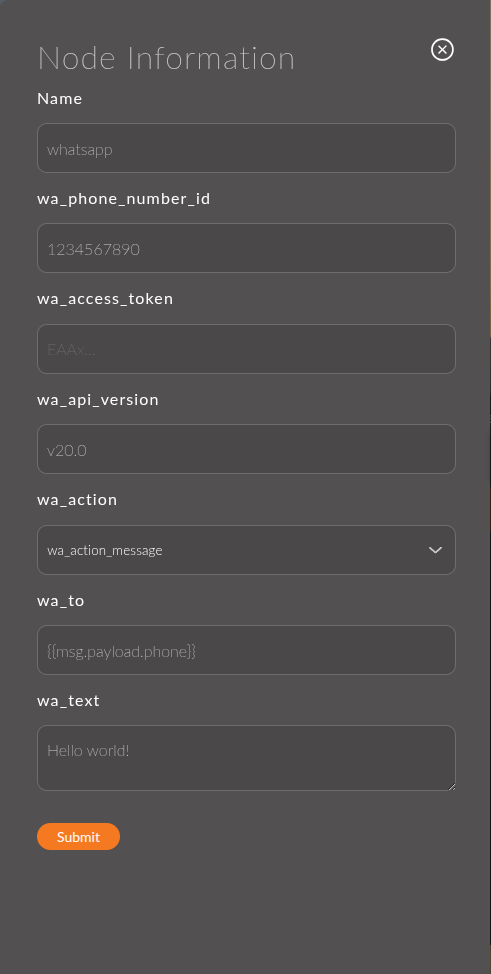
Each heading below shows the field label from the node form, followed in parentheses by the key under which the value is saved in the JSON schema.
1. Phone Number ID (phoneNumberId)
The ID of the sender number in Meta. You can find it under WhatsApp → Getting Started in Meta Business Manager.
Supports Mustache.
Example:
{{flow.phoneNumberId}}
2. Access Token (accessToken)
A permanent access token from Meta Business Manager.
Supports Mustache, so you can store the token in a flow variable (flow) and insert it with {{variable}}.
Example:
{{flow.whatsappToken}}
3. API Version (apiVersion)
The Graph API version used for requests. A static field. Defaults to v20.0.
Example:
v20.0
4. Action (action)
The type of message to send. Options:
- Message (default): a plain text message. Enables the Recipient and Message text fields.
- Template: a template message approved in advance in Meta. Enables the Recipient, Template name, Localization, and Components fields.
5. Recipient (to)
The recipient's phone number in international format: with the country code, without the + sign, and without spaces. This field is available with both Action options.
Supports Mustache.
Example:
{{payload.user.phone}}
or a static value: 79001234567
6. Message text (text)
The message text. Used only when Action is Message.
Supports Mustache.
Example:
Your order #{{payload.orderId}} has been placed successfully. Please wait for delivery.
7. Template name (templateName)
The name of a template approved in Meta Business Manager. Used only when Action is Template.
Supports Mustache.
Example:
order_confirmation
8. Localization (locale)
The template language. It must exactly match the template language set in Meta. Used only when Action is Template.
Examples:
en_US: English (US)fr_FR: French
9. Components (components)
Template parameters: the variable values inserted into the template when the message is sent. Used only when Action is Template.
Add components with the + Component button. They are numbered (Component 1, Component 2, …), and each one has three fields:
- type: the template section,
header(the header) orbody(the main body). - parameter_name: the variable name as defined in the template in your WhatsApp Business account.
- text: the value inserted in place of the variable. Supports Mustache.
Example:
type: body  |  parameter_name: order_id   |  text: {{payload.orderId}}
type: body  |  parameter_name: amount     |  text: {{payload.totalPrice}}
Usage examples
Example 1: Text notification about an order
Flow:
[events: order_created] ---> [whatsapp]
Node settings:
- Phone Number ID:
{{flow.phoneNumberId}} - Access Token:
{{flow.whatsappToken}} - API Version:
v20.0 - Action:
Message - Recipient:
{{payload.order.phone}} - Message text:
Your order #{{payload.order.id}} has been received. Total: {{payload.order.totalPrice}} RUB.
Result:
When an order is created, the user receives a WhatsApp message with the order details.
Example 2: Template message with variables
Flow:
[events: order_status_changed] ---> [whatsapp]
Node settings:
- Action:
Template - Recipient:
{{payload.order.phone}} - Template name:
order_status_update - Localization:
en_US - Components:
type: body | parameter_name: order_id | text: {{payload.order.id}}type: body | parameter_name: status | text: {{payload.order.status}}
Result:
The user receives the approved template message with the order number and status filled in.
You must create template messages and get them approved in Meta Business Manager beforehand. The values of the Template name and Localization fields must exactly match the parameters of the approved template.